How I Built a Personal AI Assistant on Telegram Using Claude
What if every message you sent on Telegram could trigger a smart, capable AI that drafts your emails, answers your questions, researches topics, and helps you stay on top of tasks? 24/7, always on, for nearly zero cost.
That's exactly what I built. In this article, I'll walk you through how I connected Anthropic's Claude AI to a personal Telegram bot: what it does, how it works, the real-world use cases it covers, and critically, the risks you need to know before you build your own.
Why Telegram + Claude?
Most people think of AI assistants as something you open in a browser tab. You navigate to a website, type your message, wait for a response, then switch back to what you were doing. The friction is small but constant, and it adds up.
Telegram is already where I communicate. It's on my phone, my laptop, my watch. The idea was simple: what if Claude lived there too? No tab switching, no logging in, no context switching. Just message, get an answer, keep moving.
The reason I chose Telegram over WhatsApp or SMS is straightforward: Telegram has a completely free, open Bot API that anyone can use. No business account, no approval process, no per-message fees from the messaging platform itself.
How It Works
The architecture is surprisingly simple. Three components work together:
- The Telegram Bot, created in seconds via
@BotFatheron Telegram. This gives you a token (an API key) that lets your code receive messages from Telegram and send replies back. - The Python Script, a small piece of code that listens for incoming Telegram messages, passes them to Claude, and sends Claude's response back. It also keeps a conversation history so Claude remembers what was said earlier in the chat.
- Railway (Cloud Hosting), a free hosting platform that runs the Python script 24/7 in the cloud, so the bot works even when your computer is off.
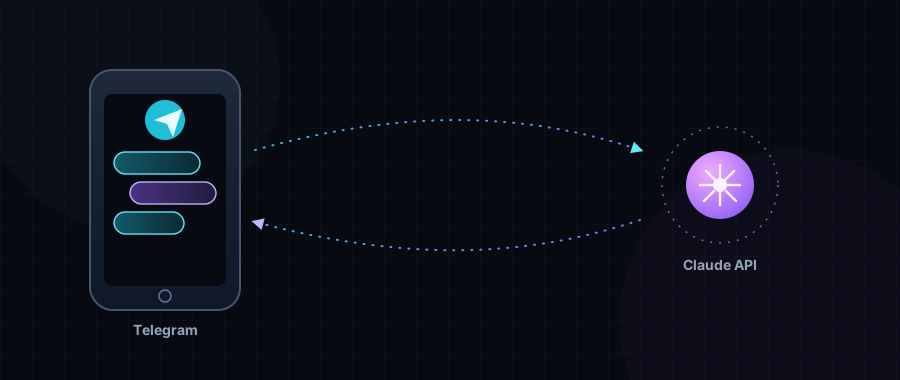
Key insight: Your Telegram messages never go directly to Anthropic. They go to your Python script first, which then calls the Claude API. This means you control the system prompt, conversation history, and who can access the bot.
The flow, end to end: you type, the bot receives it, Claude processes and responds, and you get a reply in seconds.
Real-World Use Cases
This isn't just a novelty. Here are the four categories where it genuinely saves time every single day:
- Drafting emails & messages. Describe the email you need and Claude writes a complete, professional draft, ready to copy and send. "Write a polite follow-up email to a client who hasn't paid invoice #342 in 3 weeks."
- Research & summarizing. Ask about any topic and get a clear, structured summary instead of digging through search results. "What are the key differences between LLC and sole proprietorship for a freelancer in Dubai?"
- Tasks & planning. Dump your to-do list into the chat and get a prioritized plan, time estimates, and structured checklists. "I have these 8 tasks today. Help me prioritize them and plan my morning."
- Answering questions. From quick factual lookups to deep explanations, Claude remembers your conversation so follow-up questions work naturally. "Explain compound interest like I'm 15, then show me how it applies to my savings."
The real magic is that it remembers context within your conversation. You can say "make that email shorter" and it knows exactly which email you mean. That makes it feel much more like a real assistant than a search engine.
⚠️ Risk Factors You Must Know
Before you build this, there are serious risk factors to understand. I want to be direct about these: they're not deal-breakers, but they require informed decisions.
High risk: Privacy & data exposure. Every message you send passes through Anthropic's API servers. Sensitive information such as financial details, private conversations, and personal data should never be sent through the bot. Anthropic's API has its own data retention policy which you must review.
High risk: Uncontrolled API costs. If your bot is publicly accessible or gets abused, API costs can spike fast. Always set a spending limit in your Anthropic console and restrict access to your Telegram user ID only. An open bot can rack up bills overnight.
Medium risk: Token security. Your Telegram bot token and Anthropic API key are essentially passwords. If they're hardcoded in code and pushed to a public GitHub repo, anyone can steal them and use your bot or your API quota. Always use environment variables.
Medium risk: Service reliability. Your bot depends on three external services: Telegram, Anthropic, and Railway. Any of them can go down, change their free-tier limits, or alter their pricing. There's no SLA guarantee on free tiers, so plan accordingly.
Low risk: AI hallucination. Claude can confidently give wrong answers. For factual, legal, financial, or medical questions, always verify the output independently. The bot is an assistant, not an authoritative source.
Low risk: No persistent memory. Conversation history is stored in memory only. When the bot restarts (after a deploy or crash), all prior conversations are lost. This is by design for simplicity, but something to be aware of.
Bottom line on risks: This bot is perfectly safe for productivity tasks: drafting, planning, general Q&A. The golden rule: never send anything through it that you wouldn't want stored on a third-party server.
How to Set It Up
The setup requires no prior programming experience, just the ability to follow steps and copy-paste carefully. Here's the high-level overview:
- Create your Telegram bot via
@BotFather. Message@BotFatheron Telegram, send/newbot, choose a name and username. You'll receive a bot token in seconds. - Get a Claude API key from Anthropic. Sign up at console.anthropic.com, create an API key, and set a spending limit. New accounts get free credits to start.
- Get your Telegram user ID. Message
@userinfoboton Telegram. It replies instantly with your unique numeric ID, used to make the bot private. - Upload the 3 bot files to a private GitHub repo. Three files:
bot.py(the main code),requirements.txt(dependencies), andProcfile(deploy config). Create a private repository and upload them. - Deploy to Railway and add environment variables. Connect your GitHub repo to Railway. Add
TELEGRAM_TOKEN,ANTHROPIC_API_KEY, andALLOWED_USER_IDin the Variables tab. Railway deploys automatically. - Message your bot on Telegram. Search your bot by username, send
/start, and you're live. Claude replies directly in your Telegram chat.
The three bot commands you'll have available:
/start  ->  Shows welcome message and capabilities
/help   ->  Shows example prompts and tips
/clear  ->  Clears conversation history (fresh start)
What Does It Cost?
This was one of my main concerns going in. Here's the honest breakdown after running it for a month of regular personal use:
| Component | Free Tier | Light Use (20 msgs/day) | Moderate Use (50 msgs/day) |
|---|---|---|---|
| Railway Hosting | $5 credit/month | Free | Free |
| Telegram Bot API | Completely free | Free | Free |
| Claude Haiku API | Free credits on signup | ~$0.40/mo | ~$1.50/mo |
| Total | Free to start | ~$0.40/month | ~$1.50/month |
I use it for about 30-40 messages a day and my monthly API bill has never exceeded $1.20. The free signup credits from Anthropic lasted my first two weeks of testing before I needed to add a payment method.
Final Thoughts
Absolutely worth building, if you value your time. The 15-minute setup pays for itself the first time you need an email drafted while you're on the go, or when you need a quick research summary without opening a browser.
The key is to go in with your eyes open: keep it private, never share sensitive data through it, set an API spending cap, and treat its answers as a starting point rather than a final authority.
The future of productivity is AI that meets you where you already are. For me, that's Telegram.